The best travel gadgets for 2025 are the ones that solve real problems without taking over your bag. Think dead batteries, missing luggage, noisy flights, weak hotel outlets, messy cables, and long travel days when your phone becomes your map, wallet, camera, translator, and boarding pass.
This guide focuses on useful, packable tech for airports, hotels, road trips, international travel, and remote work. Some picks are true gadgets. Others are simple accessories that make your travel setup smoother.
1. A Reliable USB-C Power Bank
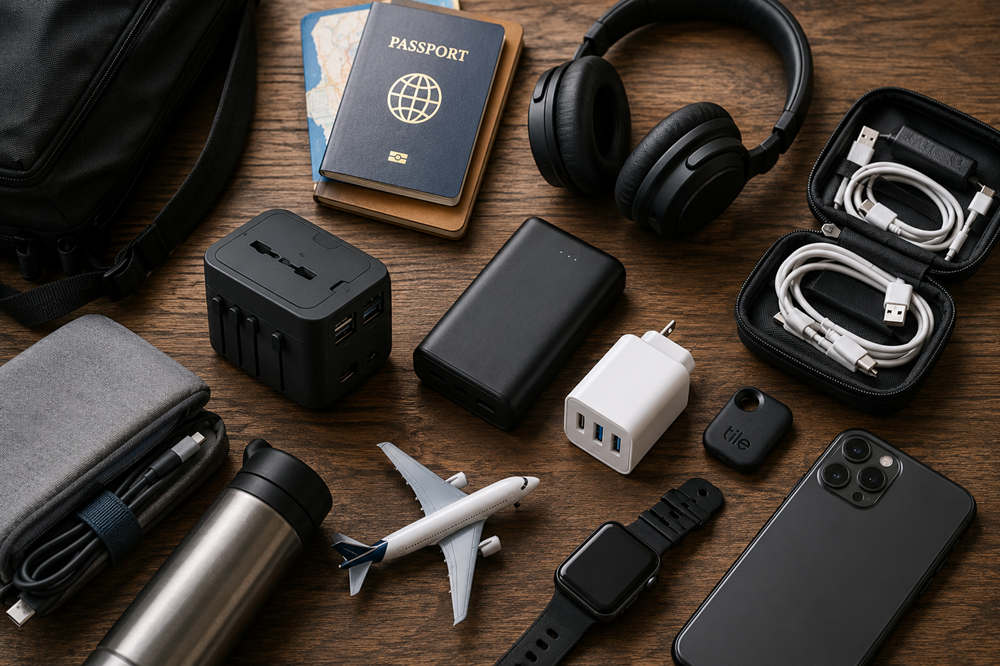
A USB-C power bank is one of the most useful travel gadgets you can pack. It keeps your phone alive when you are using maps, ride-share apps, boarding passes, translation tools, mobile data, and your camera all day.
For short trips, a 10,000mAh power bank is usually enough for a phone top-up or two. For long flights, layovers, family trips, or multiple devices, a 20,000mAh model is more practical. USB-C Power Delivery is worth having if you want faster charging for phones, tablets, handheld gaming devices, or some laptops.
Choose a model from a reputable brand with clearly listed capacity, wattage, and safety details. Built-in cable models are convenient, but make sure the built-in cable matches the devices you actually carry.
Pack power banks in your carry-on, not your checked luggage. The TSA power bank rules say portable chargers with lithium-ion batteries must go in carry-on bags, and the FAA lithium battery guidance says spare lithium batteries and power banks should be removed from gate-checked bags and kept with the passenger in the cabin.
2. A Universal Travel Adapter with USB-C Ports
A universal travel adapter is essential for international trips, but the best versions do more than change the shape of your plug. A modern adapter should include USB-C ports, USB-A ports, and a compact design that works in tight hotel outlets.
Before buying one, understand the difference between a plug adapter and a voltage converter. A plug adapter helps your charger fit the outlet. A voltage converter changes electrical voltage. Many phones, tablets, and laptops support dual voltage, but some hair tools and appliances do not.
Look for safety shutters, sturdy plug sliders, and enough ports for your everyday setup. If you travel with a laptop, check whether your charger and adapter can support the wattage you need.
3. Noise-Canceling Headphones or Earbuds
Noise-canceling headphones can make flights, trains, airports, hotels, and shared spaces feel less draining. They reduce background noise so you can listen to music, watch a movie, take a call, or simply enjoy a quieter trip.
Over-ear headphones usually offer stronger noise cancellation and better long-flight comfort. Earbuds are easier to pack and better for light travelers. The right choice depends on your bag space, comfort preference, and how long you normally wear them.
For travel, look for good battery life, quick charging, a secure fit, transparency mode, and a compact case. A wired backup cable or airplane audio adapter can still be useful on older in-flight entertainment systems.
4. A Bluetooth Luggage Tracker
A Bluetooth luggage tracker is small, light, and helpful if you check bags. It will not stop an airline from misplacing your suitcase, but it can show whether your bag is still at the departure airport, near baggage claim, or somewhere unexpected.
Most small luggage trackers are not true GPS devices. They usually update their location when they are detected by nearby compatible phones or devices in a crowdsourced network. That means performance can depend on the tracker brand, your phone ecosystem, airport traffic, and network coverage.
AirTag is the most obvious choice for iPhone users. Android travelers can look at Google Find Hub-compatible trackers, Samsung SmartTag options, or cross-platform trackers such as Tile. Apple’s Share Item Location feature lets users share an AirTag or Find My accessory location with third parties such as airlines, while Google says Find Hub can share an item’s live location with airlines when supported.
Use trackers for luggage, keys, backpacks, and gear. Do not use them to track people without consent.
5. A Compact Cable Organizer
A cable organizer is not flashy, but it can save you from a messy bag. It keeps cords, adapters, memory cards, SIM tools, earbuds, and small chargers in one place.
Look for elastic loops, small zip pockets, a slim shape, and enough structure to protect fragile accessories. The best version should fit easily in a backpack, suitcase pocket, or personal item.
This is especially useful for families, remote workers, creators, and anyone carrying more than one device. It also makes hotel setup easier because your charging gear is already grouped together.
6. A Multi-Port GaN Charger
A multi-port GaN charger can replace several bulky charging bricks. GaN chargers are usually smaller and more efficient than older chargers, which makes them ideal for travel.
A 45W charger may be enough for a phone, tablet, earbuds, and small accessories. A 65W charger is a better all-around pick for many travelers because it can handle more devices and some laptops. A 100W charger makes sense if you carry a power-hungry laptop or need to charge several items quickly.
The key is matching the charger to your devices. A compact charger with two USB-C ports and one USB-A port may be more useful than a larger model with power you do not need.
7. A Portable Wi-Fi Hotspot or eSIM-Friendly Setup
Staying connected is one of the biggest travel tech problems. A portable Wi-Fi hotspot can be useful for families, remote workers, and travelers who need to connect several devices. An eSIM is often simpler for solo travelers because it works directly on your phone.
For international trips, compare coverage, data limits, hotspot support, speed caps, and expiration dates. Some plans are fine for maps and messages but not ideal for video calls, file uploads, or long workdays.
Try not to rely only on public Wi-Fi in airports, cafes, hotels, and stations. The FTC’s public Wi-Fi security tips advise using secure sites with encryption and avoiding risky account habits, especially when entering personal information.
8. A Foldable Phone Stand or MagSafe Travel Stand
A foldable phone stand is small, cheap, and more useful than it looks. It turns your phone into a hands-free screen for flights, hotel rooms, video calls, translation apps, maps, and travel planning.
For iPhone users with MagSafe-compatible cases, a magnetic travel stand can be especially clean. For everyone else, a simple folding stand with adjustable angles works well.
Look for something stable, lightweight, and flat enough to fit in a tech pouch. It should hold your phone securely without taking up much space.
9. A Travel-Friendly Tech Pouch for Remote Work
A remote-work tech pouch is like a small mobile office kit. It keeps the tools you need for work in one place, so you are not stuck in a hotel room or coworking space missing one important adapter.
A practical setup might include a USB-C hub, small mouse, HDMI adapter, laptop charger, USB-C cable, backup storage drive, and compact notebook. Some travelers may also want a privacy screen, webcam cover, or Ethernet adapter.
The goal is not to carry every accessory you own. Pack the few items that protect your workday from common travel problems: weak Wi-Fi, missing ports, low battery, and last-minute presentation needs.
10. A Compact E-Reader or Small Tablet
An e-reader or small tablet can replace books, printed guides, and downloaded entertainment. For readers, an e-reader usually has better battery life than a phone and is more comfortable for long reading sessions.
A small tablet is more flexible. It can store movies, guidebooks, notes, travel documents, offline maps, and planning apps. It can also be useful for families who want entertainment without handing over a main phone.
If you mainly read, choose an e-reader. If you want one device for reading, streaming, planning, and light work, a small tablet may be a better fit.
11. A Portable White Noise Machine or Sleep Gadget
Sleep can be difficult when you are away from home. Hotels, hostels, city apartments, cruise cabins, and overnight flights all come with unfamiliar sounds.
A small white noise machine works well if you do not like sleeping with earbuds. Sleep earbuds are better if you want something private and compact. A sleep mask with built-in audio may help on flights, but only if it feels comfortable for more than a few minutes.
Try any sleep gadget at home before packing it for a major trip. You do not want to discover on a red-eye flight that the fit, sound, or controls bother you.
12. A Smart Water Bottle or UV Water Purifier
A smart water bottle can remind you to drink water during long travel days. A UV purifier bottle is more specialized and may appeal to hikers, road trippers, campers, or travelers who want an extra layer of water treatment.
For flights, the simplest plan is to bring an empty bottle through security and fill it afterward. The TSA liquids rule limits most carry-on liquids to containers of 3.4 ounces, or 100 milliliters, unless an exception applies.
Do not overbuy here. For short city trips, a regular reusable bottle may be enough. For outdoor travel or long drives, a more advanced bottle may be worth considering.
13. A Mini Bluetooth Keyboard
A mini Bluetooth keyboard is useful if you want to work from a phone or tablet without carrying a laptop. It can make emails, notes, travel planning, and quick documents much easier.
Foldable keyboards are the most packable, but some people dislike the split layout or smaller keys. Slim one-piece keyboards are usually more comfortable, though they take up more room.
Before buying, check battery life, device compatibility, and whether it can switch between devices. This gadget is best for light work. If you write for hours every day, a laptop may still be the better tool.
14. A Digital Luggage Scale
A digital luggage scale is simple, affordable, and easy to ignore until you need it. It helps you avoid overweight baggage fees, especially on international flights, budget airlines, and return trips after shopping.
Look for one with a clear display, strong strap, and compact shape. It should be easy to use with one hand and small enough to live in your suitcase between trips.
This is not exciting tech, but it solves a specific travel problem. For frequent flyers, that is enough to make it worth packing.
15. A Small Emergency Tech Kit
A small emergency tech kit is your backup plan when something breaks, dies, or goes missing. It should be small enough that you barely notice it in your bag.
A useful kit might include a short USB-C cable, backup charging cable, tiny wall charger, SIM tool, small flashlight, wired earbuds, and compact power bank. You may also want offline copies of hotel addresses, reservation numbers, and emergency contact details.
This kit is especially helpful when your main cable fails, your earbuds run out of battery, your phone is low, or you need to swap a SIM card after a long flight.
How to Choose the Right Travel Gadgets for Your Trip
For Weekend Trips
Keep it simple. A power bank, multi-port charger, cable organizer, and earbuds are enough for most short trips. You probably do not need a full remote-work pouch, extra keyboard, or advanced sleep gadget unless the trip has a specific purpose.
For International Travel
Prioritize a universal travel adapter, eSIM or hotspot setup, luggage tracker, power bank, and compact charger. These cover the biggest international travel issues: outlets, mobile data, checked bags, and long days away from easy charging.
For Long Flights
Focus on comfort and battery life. Noise-canceling headphones, a power bank, e-reader or tablet, phone stand, and sleep gadget can make a long flight feel much more manageable.
For Remote Work
Pack a GaN charger, tech pouch, USB-C hub, compact mouse, reliable cable, and backup internet plan. Remote-work travel is less about novelty gadgets and more about preventing small problems that can ruin a workday.
For Family Travel
Families should think about shared charging, entertainment, and lost-item prevention. Trackers, tablets, headphones, cable organizers, and backup batteries can reduce stress when several people are using devices at once.
What Travel Gadgets Should You Skip?
Not every travel gadget deserves space in your bag. Skip bulky items with one narrow use, especially if your phone already does the same job well. Be careful with cheap no-name power banks or fast chargers that do not clearly list capacity, wattage, or safety information.
Be cautious with smart luggage, too. The IATA baggage guidance says smart bags that use lithium batteries for GPS, charging, or motorized wheels are generally allowed only if the battery can be removed. If the battery is not removable, the bag may not be accepted as checked or cabin baggage, depending on the airline.
In many cases, a regular suitcase plus a small tracker is simpler than a suitcase filled with electronics. Also skip travel adapters with unclear safety details, oversized gadgets that add stress, and anything that requires too much setup for too little benefit.