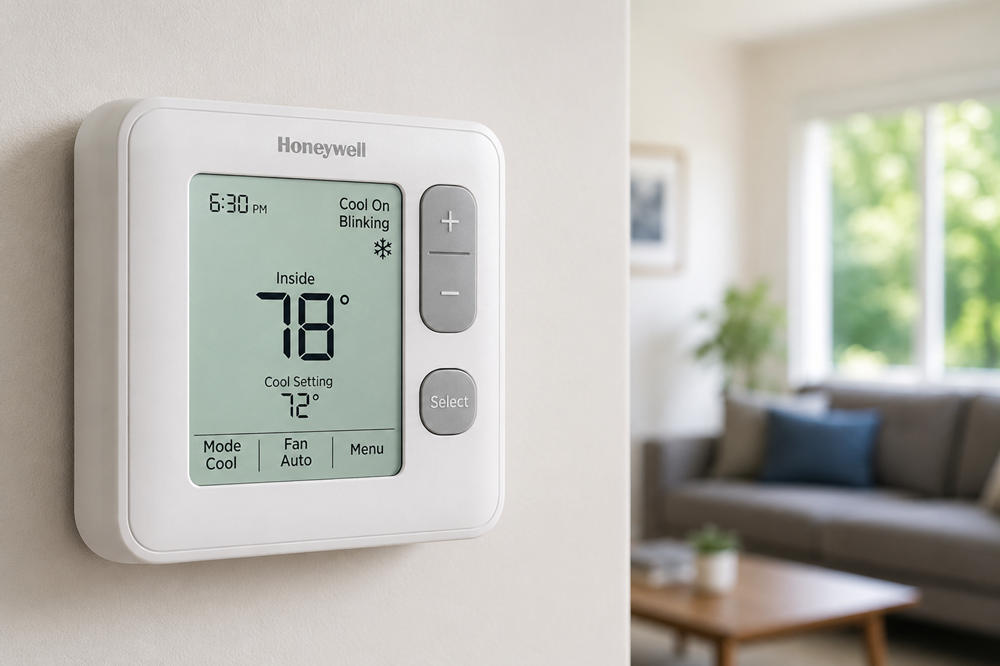
A blinking “Cool On” message on a Honeywell thermostat can be confusing, especially when the house feels warm and the air conditioner is not starting right away. In many cases, it is not a sign that the thermostat is broken. It usually means the thermostat is waiting before turning on the cooling system.
Start with the simplest answer: wait about five minutes. If the AC starts after that, the blinking message was likely a normal compressor protection delay. If “Cool On” keeps blinking and the AC never starts, move through the checks below in order: thermostat settings, batteries or display power, HVAC power, indoor and outdoor unit behavior, and possible wiring or equipment issues.
What Does “Cool On” Blinking Mean?
On a Honeywell thermostat, “Cool On” means the thermostat is calling for air conditioning. The room is warmer than the temperature you set, so the thermostat is trying to start the cooling cycle.
When “Cool On” is blinking, the thermostat may be holding the system in a short waiting period. Some Honeywell Home models may show a similar message, such as “Wait,” “Waiting for Equipment,” or a flashing snowflake icon. The wording can vary by model, but the meaning is often the same.
A solid “Cool On” message usually means the thermostat is actively calling for cooling. A blinking “Cool On” message usually means the thermostat is not ready to start the equipment yet, often because it is protecting the compressor from restarting too quickly.
Why Honeywell Thermostats Make You Wait
The most common reason for a blinking “Cool On” message is compressor protection. Your air conditioner’s compressor should not be turned off and back on too quickly. Rapid restarts can put stress on the system, so many thermostats build in a short delay before cooling begins.
You may notice this delay after changing the thermostat to Cool mode, lowering the temperature setting, replacing batteries, resetting the thermostat, or after a power interruption. It can also happen if the AC recently finished a cooling cycle and you ask it to start again right away.
This delay can feel frustrating on a hot day, but it is usually normal. If the thermostat stops blinking after a few minutes and the AC starts, there may be nothing to repair.
How Long Should “Cool On” Blink?
In most normal cases, “Cool On” should blink for only a few minutes. Honeywell Home support commonly points to a delay of up to about five minutes.
During that short waiting period, avoid repeatedly changing the temperature or switching the thermostat on and off. That can make it harder to tell whether the thermostat is simply waiting or whether the cooling system is not responding.
If the message clears and cool air begins flowing, the thermostat likely did its job. If “Cool On” keeps blinking longer than about five minutes and the AC still does not start, continue with the next checks.
Step 1: Check the Thermostat Settings
Before checking equipment, start with the thermostat screen.
Make sure the system mode is set to Cool. If it is set to Heat, Off, or the wrong Auto setting, the air conditioner may not start when you expect it to.
Next, set the temperature several degrees below the current room temperature. For example, if the room is 78°F, set the thermostat to 72°F or lower for testing. This gives the thermostat a clear reason to call for cooling.
Then check the fan setting. For normal cooling, Auto is usually the best choice. If the fan is set to On, air may blow from the vents even when the outdoor AC unit is not cooling. That can make the system seem active when only the indoor blower is running.
Step 2: Check the Thermostat Power
Some Honeywell thermostats use batteries. Others are powered by the HVAC system. Some use both. If your model uses batteries and the display looks dim, slow, or inconsistent, replace the batteries with fresh ones.
Weak batteries can cause unreliable thermostat behavior. The screen may still light up, but the thermostat may not control the system properly.
If the display is blank, flickering, or restarting, the thermostat may not be getting steady power. In that case, the issue could be weak batteries, a loose faceplate, a furnace or air handler power problem, a blown low-voltage fuse, or another control-power issue.
Step 3: Check the HVAC Power Supply
A thermostat can ask for cooling, but the HVAC system still needs power to respond. If “Cool On” keeps blinking and nothing starts, check the basic power points around the system.
First, check the circuit breaker for the furnace, air handler, and air conditioner. If a breaker has tripped, reset it once. If it trips again, do not keep forcing it back on. Repeated tripping usually means a deeper electrical or equipment problem.
Next, check the furnace or air handler power switch. Many indoor units have a switch nearby that looks like a regular light switch. If it is off, the indoor unit may not power the control system or move air through the house.
Also make sure the furnace or air handler door panel is fully closed. Some systems have a safety switch that prevents operation when the door is loose or removed.
If your outdoor AC unit has a visible disconnect box, make sure it has not been turned off. Only check what is safe and obvious. Do not open electrical panels or handle wiring unless you are trained to do so.
Step 4: Check What the Indoor and Outdoor Units Are Doing
After waiting through the delay and checking basic power, look and listen to the system. You do not need to take anything apart. You are only trying to observe what is running.
If the indoor blower is running and air is coming from the vents, but the outdoor unit is silent, the thermostat may be calling for cooling while the outside AC unit is not responding.
If the outdoor unit is running but no air is coming from the vents, the problem may be with the indoor blower, air handler, furnace control system, or airflow path.
If air is blowing but it is warm, the thermostat may not be the main problem. The system may be running without actually cooling the air.
If nothing runs at all, the issue may involve thermostat power, HVAC power, the indoor control system, or low-voltage wiring. At that point, the blinking message is only one clue.
Step 5: Consider Wiring or Voltage Problems
Wiring becomes more likely if the problem started after a thermostat replacement, recent HVAC work, a removed faceplate, painting near the thermostat, or any change to the thermostat wires.
In many systems, the thermostat uses the Y wire to call for cooling and the G wire to control the fan. If a wire is loose, disconnected, or attached to the wrong terminal, the thermostat may show a cooling call while the system does not respond correctly.
If you are comfortable doing a simple visual check, turn off power to the HVAC system first and make sure the thermostat faceplate is seated properly. You may also look for an obviously loose wire. Do not test live voltage, move wires around by guesswork, or change terminal connections without the correct wiring guide for your system.
Honeywell Home notes that thermostat voltage problems can also cause cooling issues. If voltage testing is needed, or if there may be shorted wires, call an HVAC professional.
Should You Reset a Honeywell Thermostat?
A reset can help in some cases, but it should not be the first fix for a blinking “Cool On” message. Start with the normal waiting period, thermostat settings, batteries, HVAC power, and visible system behavior.
Resetting may be useful if the thermostat is frozen, unresponsive, or acting strangely after a power interruption. However, reset steps vary by Honeywell model. A reset may also erase schedules, Wi-Fi settings, preferences, or installer settings.
Before resetting, find the exact model number and use the correct Honeywell Home manual or support page. This is especially important for Wi-Fi, smart, T-series, and programmable models.
When the Problem Is Probably Not the Thermostat
Sometimes the thermostat is doing exactly what it should: calling for cooling and waiting for the system to respond. If the AC never starts, the issue may be somewhere else in the HVAC system.
Possible HVAC-side causes include a tripped breaker, failed capacitor, faulty contactor, clogged condensate drain safety switch, dirty air filter, frozen coil, low refrigerant, damaged low-voltage wiring, control board issue, or compressor problem.
You do not need to diagnose all of those yourself. The practical point is simple: if the thermostat keeps calling for cooling but the equipment does not run or does not cool, the problem may be beyond the thermostat screen.
When to Call an HVAC Technician
Call an HVAC technician if “Cool On” keeps blinking longer than about five minutes and the AC still does not start after you have checked the thermostat settings, batteries, breaker, furnace or air handler switch, and indoor unit door.
You should also call for help if the outdoor unit hums but does not run, the breaker trips repeatedly, the thermostat keeps losing power, the AC blows warm air, or the system starts and stops over and over.
Professional help is especially important if the thermostat was recently installed or rewired. A small wiring or setup mistake can stop cooling even when the thermostat display looks normal.
Stop using the system and get help promptly if you notice a burning smell, water leaking around the indoor unit, ice on refrigerant lines, or loud unusual noises from the outdoor unit.
How to Prevent Future Cooling Problems
You do not need to prevent the normal compressor delay. That short pause is part of how many thermostats protect the cooling system. What you can do is reduce the chance of other problems that make the AC fail after the delay ends.
Replace thermostat batteries before they get weak if your model uses them. Keep the air filter clean. Avoid rapid thermostat changes, especially turning cooling off and on repeatedly within a few minutes.
Keep leaves, grass, and debris away from the outdoor unit so it can release heat properly. Regular air conditioner maintenance also helps the system run more efficiently, especially when filters, coils, fins, and refrigerant lines are checked before heavy cooling season.
It also helps to keep your thermostat model number handy. Honeywell thermostats vary by model, and the right manual can save time when you need reset steps, wiring details, or setup instructions.
Conclusion
A Honeywell thermostat with “Cool On” blinking is usually not a reason to panic. In many cases, it means the thermostat is using a short compressor protection delay. Wait about five minutes and avoid changing settings repeatedly during that time.
If the AC starts after the delay, the thermostat is probably working normally. If “Cool On” keeps blinking and the system never cools, check the thermostat settings, batteries, HVAC power, indoor unit door, and whether the indoor and outdoor units are running.
If those basic checks do not solve the problem, the issue may involve wiring, voltage, or the AC system itself. At that point, a qualified HVAC technician can safely test the system and find the real cause.