A hot phone is easy to notice. The screen may dim, charging may slow down, apps may lag, or the device may feel uncomfortable in your hand. Sometimes this happens during normal use, especially while charging, gaming, recording video, using GPS, or downloading large files. Other times, it is a sign that the phone needs a break.
The safest way to cool down a phone is not to shock it with cold air, ice, or water. It is to reduce the workload, move it away from heat, improve airflow, and let it cool naturally. Below are 12 safe fixes to try first, followed by tips for charging, gaming, prevention, and warning signs that may point to a bigger problem.
What to Do First When Your Phone Feels Too Hot
If your phone already feels too warm, start here. These steps are simple, but they solve most everyday overheating situations.
1. Stop using the phone for a few minutes. Pause anything demanding, such as a game, video call, camera recording, hotspot session, livestream, or navigation app. Heavy tasks keep the processor, screen, and wireless radios active, which makes cooling slower.
2. Move it out of direct sunlight. A phone can heat up quickly on a patio table, beach towel, car seat, windowsill, or dashboard. Move it to shade or indoors as soon as possible.
3. Unplug it from the charger. Charging creates heat, and fast or wireless charging can make that heat more noticeable. If the phone is already hot, unplug it and let it cool before charging again.
4. Remove the case. A thick case can trap heat, especially during charging or gaming. Apple notes that removing the case can help if an iPhone tends to heat up while charging.
5. Place it on a cool, dry, flat surface. A desk, table, or countertop is better than a bed, couch, pillow, blanket, or pile of clothes. Soft surfaces reduce airflow and hold warmth around the phone.
6. Turn off the screen. The display is one of the biggest power users on a phone. Locking the screen or lowering brightness gives the phone less work to do.
7. Close the apps that are actively pushing the phone. You do not need to close every app obsessively, but stop the obvious heat-makers: games, video editors, camera apps, maps, hotspot, streaming apps, and video calls.
8. Turn on Airplane Mode for a short time. This can help when the phone is still heating up, especially in weak-signal areas. A phone may work harder when it is constantly searching for a stable connection.
9. Turn off Bluetooth, hotspot, and GPS if you do not need them. These features are useful, but they add workload. Temporarily switching them off can help the phone cool faster.
10. Stop charging other devices from your phone. Reverse wireless charging or cable-based power sharing can create extra battery heat. Turn it off until the phone feels normal again.
11. Restart the phone if it stays hot after heavy use. A restart can clear a stuck app, background process, or system task that keeps the phone busy even after you stop using it.
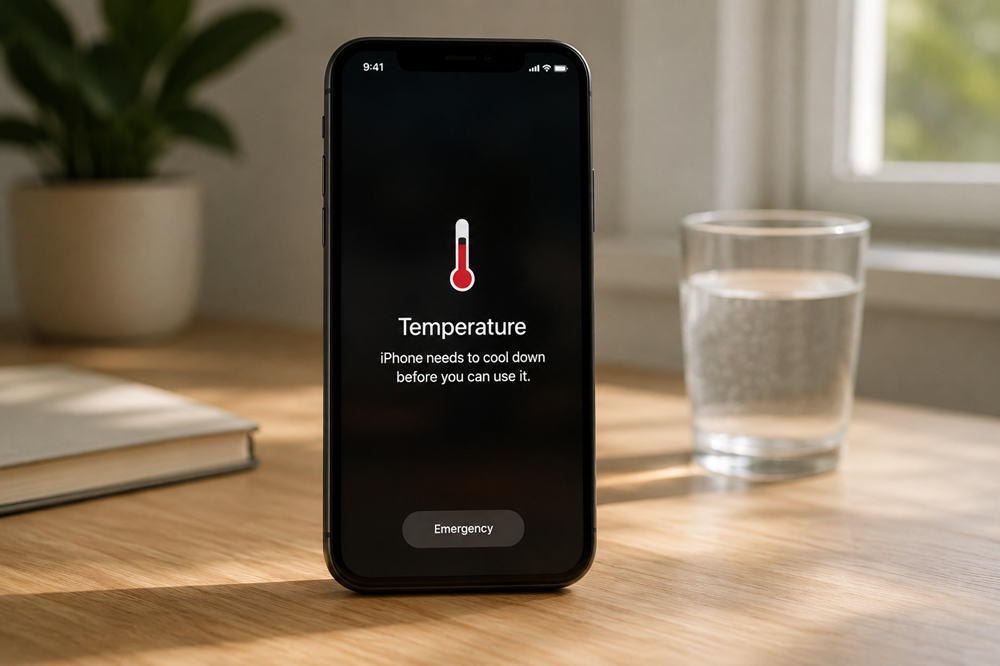
12. Power it off if you see a temperature warning. If the phone shows a heat warning, shuts down features, or feels too hot to hold comfortably, stop using it. Apple’s support guidance says to turn off the device, move it away from direct sunlight, and allow it to cool when a temperature warning appears.
Why Your Phone Gets Hot
Your phone is basically a small computer inside a thin shell. The processor, battery, display, camera, modem, and charging system all create heat when they work. Because phones do not have large fans like laptops or desktops, they rely on the body of the device to spread and release that heat.
Some warmth is normal. Phones often heat up during setup, backup restore, system updates, wireless charging, gaming, high-quality video streaming, camera recording, GPS navigation, and large downloads. Google’s Pixel guidance also notes that phones can get warm when playing media, recording HD video, tethering, uploading or downloading lots of data, restoring a backup, or doing those tasks while charging.
The environment matters just as much as the task. A phone left in a hot car, direct sunlight, a tight pocket, or a poorly ventilated case has a harder time releasing heat. Samsung’s device temperature guidance lists hot environments, direct sunlight, gaming, GPS tracking, defective chargers, system updates, setup, and data transfer as common factors that can affect device temperature.
How to Cool Down Your Phone While Charging
Charging is one of the most common times for a phone to feel warm. That does not automatically mean something is broken, but the way you charge can make a big difference.
Start by removing the case and placing the phone on a hard, open surface. Avoid charging under a pillow, blanket, stack of papers, or inside a bag. Heat needs somewhere to go, and covered charging traps it around the device.
Use a trusted charger and cable. A damaged, cheap, or incompatible charger can create unnecessary heat and may not work properly with the phone’s charging system. This is especially important with fast charging, where the charger, cable, and phone need to manage power safely.
Avoid gaming, recording video, using GPS, or running a hotspot while charging. Those tasks already make the phone work hard. Adding charging heat on top of that makes overheating more likely.
If wireless charging makes your phone noticeably warmer, try wired charging for a while. Wireless charging is convenient, but it can generate extra heat if the phone is not aligned well on the charging pad or if the room is already warm.
If your phone says charging is on hold, paused, or limited because of temperature, let it cool. Apple explains that iPhone charging may slow or stop in hot or cold conditions and resume automatically when the battery returns to a safe temperature.
How to Cool Down Your Phone During Gaming, Streaming, or Video Calls
Gaming, streaming, and video calls create heat because they use several parts of the phone at once. The screen stays bright, the processor works harder, speakers or cameras may stay active, and Wi-Fi or mobile data keeps moving information in the background.
Lower the brightness first. It is one of the quickest changes you can make without stopping everything. If you are gaming, reduce graphics quality, frame rate, or performance mode if the game allows it.
For video calls, turn off background effects, avoid charging during the call, and switch to Wi-Fi if mobile data is struggling. For streaming, download shows or videos ahead of time when possible instead of streaming over a weak signal in hot weather.
Navigation can also heat up a phone, especially in a car. Avoid mounting the phone where the sun hits it directly. A shaded mount is better than a dashboard spot that turns the phone into a mini solar panel.
Phone cooling accessories may help during long gaming sessions, but they should not replace basic heat habits. Keep the phone out of direct sun, avoid charging while gaming, and stop if the device becomes uncomfortable to hold.
What Not to Do When Your Phone Overheats
The fastest-sounding fixes are often the riskiest. Do not put your phone in the freezer. Do not put it in the fridge. Do not run it under cold water. Do not press an ice pack directly against the back.
Extreme cooling can create condensation, temperature shock, or moisture problems inside the device. AP’s summer tech safety coverage warns that fridges and freezers are a bad idea because condensation can cause water damage.
Do not keep charging a phone that feels extremely hot. If the device is slowing down, pausing charging, showing a warning, or shutting off features, it is already trying to protect itself.
Also do not ignore physical warning signs. A swollen battery, lifted back panel, burning smell, smoke, popping sound, or sudden extreme heat is not normal. Stop using the phone and contact the manufacturer or a qualified repair provider.
How to Tell If Your Phone Is Too Hot
A slightly warm phone after charging or gaming is usually normal. A phone that changes behavior because of heat is different.
Signs of overheating may include a dimmed screen, slower charging, paused charging, laggy performance, closed apps, disabled camera flash, weaker connectivity, a temperature warning, or a sudden shutdown. Apple notes that when an iPhone or iPad gets too warm, charging may slow or stop, the display may dim or go black, camera features may be temporarily disabled, and performance may be reduced.
The simplest test is comfort. If the phone is too hot to hold, stop using it. A phone should not feel painfully hot during normal browsing, messaging, music playback, or light app use.
How to Stop Your Phone from Overheating Again
Prevention is mostly about reducing avoidable stress. Keep your software and apps updated, because updates often include bug fixes and battery improvements. If one app is constantly draining power in the background, update it, restrict its background activity, or uninstall it.
Lower brightness when you can, especially outdoors. High brightness makes the screen easier to see in sunlight, but it also creates heat and drains battery quickly.
Use a case that fits your exact phone model. A poorly fitted case can trap heat, interfere with wireless charging alignment, or make the phone work harder than it needs to. In summer, a slimmer case may be better than a bulky rugged case during long charging or gaming sessions.
Do not leave your phone in a parked car. Apple says iPhone and iPad are designed for use in ambient temperatures between 32°F and 95°F, and parked cars can exceed safe storage temperatures. Direct sun, car dashboards, and hot seats are some of the easiest ways to overheat a phone.
Use Wi-Fi when possible. A weak mobile signal can make the phone work harder, especially during video calls, uploads, streaming, maps, and hotspot use.
Finally, pay attention to charging habits. Use reliable cables, replace damaged adapters, and avoid charging setups that leave the phone covered, pressed against soft fabric, or sitting in direct sun.
When Phone Heat Could Mean a Bigger Problem
Some heat is normal. Repeated overheating is not. Take it seriously if the phone gets hot while sitting idle, overheats every time it charges, drains battery unusually fast, shuts down repeatedly, or becomes hot after a drop, water exposure, or repair.
Battery swelling is the clearest red flag. If the screen or back panel starts lifting, do not press it back together. Do not keep charging it. A swollen battery needs professional attention.
You should also get help if the phone smells burnt, makes unusual sounds, shows repeated temperature warnings, or becomes hot during light tasks like texting or checking email. When a phone keeps overheating even after normal cooling steps, the issue may be a failing battery, damaged charger, software bug, or hardware problem.