
Your internet provider helps connect your phone, laptop, TV, and other devices to the web. So it makes sense to wonder how much it can actually see.
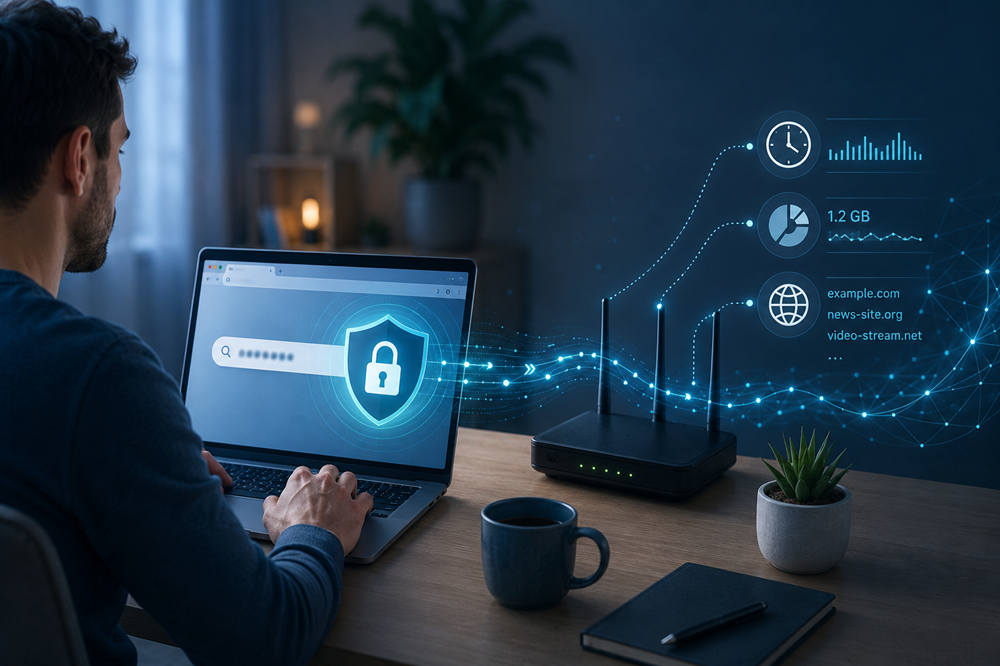
The simple answer is: your internet provider usually cannot see the exact words you search on secure websites, but it can still see some parts of your online activity. It may know which websites you connect to, when you are online, and how much data you use.
Can My Internet Provider See What I Search?
In most cases, your internet provider cannot read the exact search phrase you type into Google, Bing, DuckDuckGo, or another modern search engine. Most major search engines use HTTPS, which encrypts the information sent between your browser and the website.
For example, if you search “best laptops for students,” your ISP may see that your device connected to Google. But it usually cannot see the exact words you typed into the search box.
That does not mean your activity is completely hidden. Your provider may still see network details around that search, such as the website domain, connection time, and data usage. It may not know your exact search sentence, but it can still see enough to understand some of your browsing patterns.
What Your Internet Provider Can Usually See
Your ISP does not see your internet the same way you see it on your screen. It usually sees connection information rather than full pages, private messages, or search text.
Here are the main things it may be able to see.
Websites You Visit
Your ISP may see that your device connected to domains like google.com, youtube.com, reddit.com, wikipedia.org, or amazon.com.
On secure HTTPS websites, it usually cannot see every page or every action inside that site. For example, it may see that you visited YouTube, but it may not see the exact video you watched. It may see that you opened a health website, but not every article you read.
Even so, website domains can still reveal a lot. If someone regularly visits banking sites, job boards, medical websites, or streaming services, the domains alone can create a rough picture of their habits. The FTC’s report on ISP privacy practices also raised concerns about how much information internet providers may collect and combine with other data.
When You Are Online
Your internet provider can usually see when your connection is active. It may log when your device connects, how long your session lasts, and how often your household uses the internet.
This does not mean a person at your ISP is sitting there watching you browse. Most of this information is handled through automated systems. Still, your provider can track general usage times and patterns.
How Much Data You Use
Your ISP can see how much data moves through your connection. It may not know exactly what you watched, downloaded, or uploaded, but it can see whether your usage is light or heavy.
Streaming movies, playing online games, joining video calls, backing up photos, and downloading large files all use noticeable amounts of data. That is why internet providers can measure usage, apply data caps, or flag unusual spikes.
DNS Requests
DNS is the system that helps your device find websites. When you type a domain name, your device often asks a DNS server where that website is located.
If you use your ISP’s default DNS service, your provider may see those domain lookups. This can show which websites your device is trying to reach, even when the website itself uses HTTPS.
Encrypted DNS can reduce this type of visibility, but it does not hide everything about your connection.
Unsecured Website Activity
If you visit a website that still uses HTTP instead of HTTPS, your ISP may be able to see much more. On an unsecured site, page content, full URLs, and some submitted information may be visible.
Most popular websites now use HTTPS, but not every page online is secure. You should avoid entering passwords, payment details, or personal information on sites that do not show a secure connection.
What Your Internet Provider Usually Cannot See
When you use secure websites and encrypted apps, your ISP has much less visibility.
Your provider usually cannot see:
- The exact words you type into a secure search engine
- Passwords entered on HTTPS websites
- Credit card details submitted through secure checkout pages
- Private messages inside encrypted messaging apps
- The body text of encrypted emails or chats
- The full content of secure webpages
- Many full URLs beyond the main domain
A simple way to think about it is this: HTTPS helps hide the content of what you are doing, but it does not hide every clue about where your device is connecting.
Does Incognito Mode Hide Searches From Your Internet Provider?
No, incognito mode does not hide your searches from your internet provider.
Incognito mode is mostly for local privacy on your device. It stops your browser from saving certain things after the session ends, such as browsing history, cookies, site data, and form entries.
That can be useful if you share a computer or do not want your search history saved in your browser. But it does not make your internet traffic invisible.
Your ISP, school, workplace, or Wi-Fi administrator may still be able to see network-level activity. So if you use incognito mode to search online, your browser may not save the session, but your provider may still see that you connected to a search engine or visited certain domains.
Can Your ISP See Google Searches?
If you use Google through a secure HTTPS connection, your ISP usually cannot see your exact Google search terms. It may see that your device connected to Google, but not the full search query.
Google itself is different. Since you are sending the search to Google, Google can process that query. If you are signed into your Google account, your searches may also be connected to your Google account activity depending on your settings.
This applies to other search engines too. Your ISP may have limited visibility into the search terms, but the search engine you use still receives the search.
Can Your Internet Provider See Your Browsing History?
Your browser history and your ISP’s network records are not the same thing.
Your browser history is stored on your device. It is the list you can open in Chrome, Safari, Firefox, Edge, or another browser. Your ISP does not see that exact list.
But your ISP can still see some browsing-related information from the network side. That may include domains visited, connection times, DNS requests, IP addresses, and data usage.
Deleting your browser history can remove local traces from your phone or computer. It does not erase records that may exist outside your device.
Does a VPN Hide Searches From Your Internet Provider?
A VPN can reduce what your ISP sees.
When you use a VPN, your traffic is encrypted between your device and the VPN server. Your ISP can usually see that you are connected to a VPN, but it generally cannot see the websites you visit through that VPN.
This can be helpful on public Wi-Fi, hotel Wi-Fi, airport Wi-Fi, school networks, or any connection where you want more privacy from the network provider.
However, a VPN does not make you fully anonymous. It shifts trust from your ISP to the VPN company. The VPN provider may now be able to see some of the activity your ISP otherwise could have seen.
That is why you should choose a VPN carefully. A random free VPN with unclear privacy practices can create more problems than it solves.
Does Private DNS or DNS Over HTTPS Help?
Private DNS and DNS over HTTPS can help protect your DNS lookups.
Normally, DNS requests may show which domains your device is trying to reach. If those requests go through your ISP, your provider may be able to see them.
Encrypted DNS sends those lookups through an encrypted connection, which can make them harder for your ISP to read. This is a useful privacy step, especially if you do not want your provider handling your DNS activity.
Still, encrypted DNS is only one layer. Your ISP may still see IP addresses, timing, data volume, and whether you are using certain privacy tools.
Who Else Can See What You Search?
Your internet provider is not the only privacy concern. Even when your ISP cannot see your exact search terms, other companies or systems may still collect information.
Search engines can see the searches you send to them. Websites can collect data about your visits, clicks, device, browser, and location range. Apps may track activity if you give them permission or use them while signed in.
Schools and workplaces may also have extra monitoring tools, especially on managed devices or controlled networks. Browser extensions can sometimes view activity too, depending on their permissions.
There is also the device itself. If your computer or phone has spyware, keyloggers, or monitoring software installed, privacy tools may not help much. Malware can capture information before it ever gets encrypted.
How to Keep Your Searches More Private
You do not need to make everything complicated. A few simple habits can improve your privacy.
Use HTTPS Websites
HTTPS protects the content of your connection. Most modern websites use it, and most browsers warn you when a site is not secure.
Avoid entering passwords, payment details, or personal information on websites without HTTPS.
Use a Privacy-Focused Search Engine
A privacy-focused search engine can reduce how much your searches are tied to your personal profile. Options like DuckDuckGo and Brave Search are popular with people who want less search tracking.
This does not hide everything from everyone, but it can reduce what the search engine itself stores or connects to you.
Turn On Encrypted DNS
Encrypted DNS can help hide domain lookups from your ISP. Many browsers and devices now offer this in privacy, security, or network settings.
It is not a complete privacy solution, but it is a useful extra layer.
Use a Reputable VPN When You Need More Privacy
A VPN can hide more browsing activity from your ISP, especially on public Wi-Fi or shared networks.
Choose carefully. Look for clear privacy practices, strong encryption, and a trustworthy reputation. Avoid unknown free VPNs that do not explain how they make money.
Do Not Rely on Incognito Mode Alone
Incognito mode is useful for keeping your browser from saving local history. It is not designed to hide you from your ISP.
Use it when you share a device or want a cleaner browser session, but do not treat it as full privacy.
Review Browser Extensions
Browser extensions can be helpful, but they can also collect browsing data. Remove extensions you do not use, and avoid installing tools from developers you do not trust.
Be Careful on Public Wi-Fi
Public Wi-Fi can expose you to more risk than your home connection. Use HTTPS sites, avoid sensitive activity when possible, and consider a VPN when using Wi-Fi at airports, hotels, cafés, libraries, or other shared locations.
Common Myths About ISP Tracking
Privacy advice online can get confusing fast. These common myths are worth clearing up.
Myth 1: Incognito Mode Hides Everything
Incognito mode does not hide everything. It mainly stops your browser from saving local history after you close the window.
Your ISP, school, workplace, and websites may still see parts of your activity.
Myth 2: HTTPS Means Nobody Can See Anything
HTTPS protects page content, passwords, forms, and search terms on secure sites. That is important.
But HTTPS does not hide every detail. The domain, connection time, IP address, and data volume may still be visible.
Myth 3: A VPN Makes You Completely Anonymous
A VPN can hide more from your ISP, but it does not erase every form of tracking.
Websites can still collect data. Apps can still track behavior. Search engines can still receive your searches. If you log into an account, that service can still connect activity to you.
Myth 4: Your ISP Can Read Every Search Word
Your ISP usually cannot read the exact words you search on secure search engines. But it may still see that you connected to a search engine and visited certain websites afterward.
That is why privacy is not all-or-nothing. Some details are protected, while others may still be visible.
So, Can Your Internet Provider See What You Search?
Your internet provider usually cannot see the exact words you search when you use a secure search engine. It may see that you connected to Google, Bing, DuckDuckGo, or another search site, but HTTPS usually protects the search phrase itself.
Your ISP can still see some surrounding activity, including domains, connection times, data use, DNS requests, and IP connections. Incognito mode does not hide that from your provider. A VPN can hide more, but only if you trust the VPN company. Encrypted DNS can help with DNS privacy, but it is not a full shield.
For better privacy, use secure websites, review your browser settings, try a privacy-focused search engine, turn on encrypted DNS, and use a reputable VPN when you need stronger protection.
Your ISP probably cannot read every search term, but it can still see more than most people realize.