
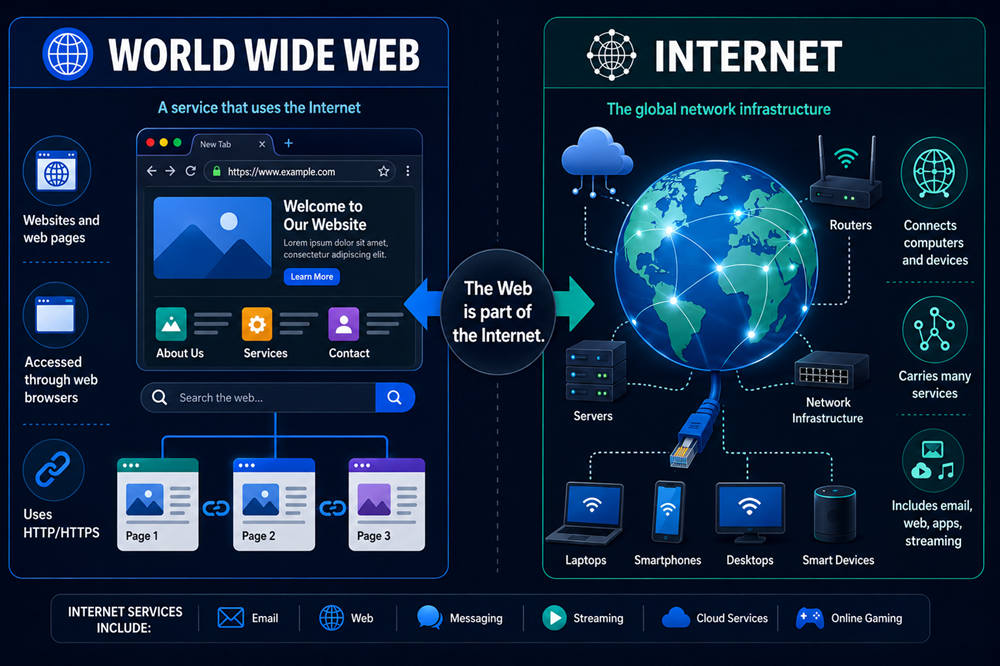
The World Wide Web vs Internet difference is easy to miss because we often use both words the same way. You might say you are “on the internet” when you are reading a website, checking email, using an app, or watching a video.
The simple difference is this: the internet is the global network that connects devices, while the World Wide Web is the collection of websites and pages you access through a browser. The web runs on the internet, but it is not the whole internet.
What Is the Internet?
The internet is the worldwide network that lets computers, phones, servers, routers, and other devices communicate with each other. It moves data from one device to another, whether that data is a message, a video, a website, a file, or a game update.
You can think of the internet as the behind-the-scenes system that makes online communication possible. It includes physical parts, such as cables, routers, data centers, and cell towers, along with digital systems that help information travel to the right place.
When your phone connects to Wi-Fi or mobile data, it is connecting to the internet. That connection allows your device to reach servers and services around the world.
The internet supports many things you use every day, including:
- Websites
- Messaging apps
- Video calls
- Online games
- Streaming apps
- Cloud storage
- Smart home devices
- File sharing
So, the internet is much more than websites. It is the larger network that carries many kinds of online activity.
What Is the World Wide Web?
The World Wide Web, usually called “the web,” is the system of websites and web pages you open through a browser. When you use Chrome, Safari, Firefox, or Microsoft Edge to visit a website, you are using the web.
The web is built around pages, links, URLs, and browsers. A web page might include text, images, videos, forms, buttons, menus, and links to other pages. A website is simply a group of related web pages under one domain name.
For example, you are using the web when you:
- Read a blog post
- Search on Google
- Visit a news website
- Shop from an online store
- Open a government website
- Read an online guide
- Log in to a web-based account
The web uses technologies like HTTP and HTTPS to help your browser request pages from servers. HTTPS is the secure version you often see on banking, shopping, login, and payment pages.
In everyday terms, the web is the part of the internet you browse.
World Wide Web vs Internet: The Main Difference
The main difference is simple: the internet is the network, and the web is one service that uses that network.
A helpful way to picture it is with roads and traffic. The internet is like the road system. The web is one kind of traffic moving across those roads.
Another way to see it: the internet is the infrastructure, while the web is something built on top of that infrastructure.
That means the web needs the internet to work. Your browser cannot load a website unless your device has an internet connection. But the internet can still support services that are not regular web pages, such as email apps, online games, video calls, and messaging platforms.
This is why the two terms are connected but not identical. In casual conversation, people may use them interchangeably. Technically, they describe different parts of how online life works.
How the Internet and Web Work Together
When you type a website address into your browser, the internet and the web work together in a fast, invisible process.
Your browser first takes the website address you entered. Your device then uses the internet to contact the server where that website is stored. The server sends the page data back, and your browser displays it as the page you see on your screen.
For example, when you visit a recipe website, your phone does not already have that recipe page stored forever. Your browser asks for it, the request travels across the internet, and the website’s server sends back the page.
That page might include text, photos, buttons, ads, videos, and links. The internet carries the data. The web gives that data a page-based format you can read, click, and navigate.
Examples of Internet Services That Are Not the Web
The easiest way to understand the difference is to look at things that use the internet but are not always part of the traditional web.
Email is one example. You can open Gmail or Outlook in a browser, but email itself is not the same thing as the web. Email can also work through mail apps on your phone or computer.
Messaging apps are another example. Apps like WhatsApp, iMessage, Signal, Telegram, and Messenger use the internet to send messages, photos, voice notes, and videos. You are online, but you are not always browsing a web page.
Online gaming also uses the internet. When you play with other people, your device communicates with game servers and other players. That does not mean you are using the World Wide Web in the same way you would when visiting a website.
Other examples include:
- Zoom or FaceTime calls
- Cloud backups
- App notifications
- File transfers
- Smart speaker commands
- Smart thermostat controls
- Voice over IP phone calls
- Some streaming app activity
This is why an app can still work even if your browser is having trouble. For example, WhatsApp might send messages while websites fail to load. That could mean your internet connection is partly working, but your browser, DNS settings, or a specific website is having an issue.
Why People Confuse the Web and Internet
People confuse the web and internet because the web is the most visible part of the internet. For many users, going online means opening a browser, searching for something, and clicking a website.
The language also became mixed over time. People say “surfing the web,” “using the internet,” and “going online” in casual conversation, even when they are talking about slightly different things.
Smartphones made the difference even less obvious. Many apps show web-based content inside the app, so you may not know whether you are looking at a normal web page, app content, or a mix of both.
For everyday use, this confusion is understandable. You usually do not need to separate the terms unless you are learning technology, troubleshooting a problem, or explaining how online services work.
Is the Web Bigger Than the Internet?
No, the web is not bigger than the internet. The web is part of the internet.
The internet is the larger system that connects devices and moves data. The web is one major way people use that system. It is huge, but it still depends on the internet to function.
Without the internet, your browser would not be able to reach websites. Without the web, the internet could still support email, messaging, gaming, file transfers, video calls, and many other services.
A simple way to remember it is this: all websites use the internet, but not everything on the internet is a website.
Why the Difference Still Matters
You do not need to be a tech expert to understand the difference. It can help you use technology more confidently and troubleshoot problems more clearly.
For example, if websites are not loading, it does not always mean the entire internet is down. The problem could be your browser, a website’s server, your Wi-Fi, your DNS settings, or your device. If other apps still work, your internet connection may not be completely broken.
It also helps you understand the difference between apps and websites. A video call, game, smart home device, or messaging app may use the internet without working like a normal website.
The distinction also improves your digital literacy. Once you know that the internet is the connection and the web is one service on that connection, the online world becomes easier to understand.
The Simple Takeaway
The internet and the World Wide Web work together, but they are not the same thing. The internet is the global network that connects devices and moves data. The web is the collection of websites and pages you access through browsers.
So, when comparing the World Wide Web vs Internet, remember this: the internet is the system that connects everything, and the web is one of the main ways you use that system.
You use the web when you browse websites. You use the internet when you send messages, play online games, join video calls, stream content, use apps, back up files, or control smart devices.